

Views: 0 Author: Site Editor Publish Time: 2026-04-01 Origin: Site


Using a sewer camera may sound highly technical at first, but in reality, the basic process is straightforward when the right equipment and correct inspection method are used. Whether you are a plumbing contractor, maintenance technician, municipal operator, or a buyer trying to understand how these systems work, knowing how to use a sewer drain camera properly is essential for getting clear inspection results and avoiding damage to the equipment or the pipeline. A sewer camera is designed to help users see inside drains, pipes, and sewer lines without destructive digging. Instead of guessing what is causing a blockage, backup, foul odor, or slow drainage, the operator can insert the camera into the pipeline and inspect the real condition of the pipe in real time. This makes diagnosis faster, more accurate, and more cost-effective. However, the quality of the inspection depends not only on the camera itself, but also on how it is used. Choosing the right access point, preparing the pipe, controlling the push rod, reading the live image correctly, and understanding when to stop or reposition are all important parts of the process. If the camera is used improperly, the inspection may miss key issues or create unnecessary difficulty. In this article, we will explain how to use a sewer camera step by step, what preparations are needed, what common mistakes to avoid, and how to improve inspection efficiency. If you are new to operating a sewer drain camera or want to refine your inspection workflow, this guide will help you understand the practical process more clearly.
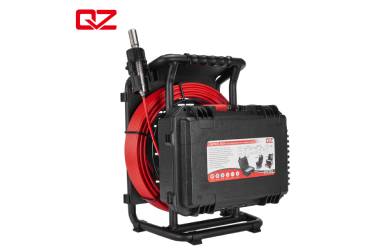
A sewer camera is a pipe inspection tool used to examine the inside of drainage systems, sewer lines, underground pipes, and other hard-to-reach passages. It allows users to identify blockages, grease accumulation, root intrusion, cracks, corrosion, offset joints, pipe collapse, standing water, and foreign objects without opening the pipe or digging unnecessarily. A sewer drain camera is widely used in residential plumbing, commercial building maintenance, industrial inspection, municipal pipeline management, trenchless repair work, and property inspection. In many situations, it is one of the most effective ways to understand the true condition of a pipe system before choosing the proper repair or maintenance solution.
Even a high-quality sewer camera will not produce good inspection results if it is not used correctly. Poor camera control may cause blurred images, missed defects, or difficulty passing through bends. An operator who rushes through the process may overlook important damage or misunderstand what appears on the screen. That is why learning the correct operating procedure is important. Proper use improves image clarity, inspection speed, diagnosis accuracy, and equipment lifespan.
Before starting an inspection, it is important to understand the basic parts of the equipment. A typical sewer drain camera system includes a camera head, LED lights, a push rod or cable, a reel, a monitor, a control box, and in some models, recording and locating functions.
The camera head is the part that enters the pipe. It must be waterproof, durable, and compact enough to move through the intended pipe size. Many camera heads are equipped with built-in LED lighting so the operator can see clearly in dark pipe environments.
The push rod is used to advance the camera through the line. It needs the right balance of flexibility and stiffness. If it is too soft, it may not move far enough. If it is too rigid, it may be difficult to navigate bends.
The monitor displays the live image from the sewer camera. Some systems also allow video recording, photo capture, zoom, brightness adjustment, and file storage. A clear and stable monitor is essential for accurate inspection.
Some advanced systems include a sonde transmitter and locator so the camera head can be tracked from above ground. A distance counter is also useful because it helps the operator measure how far the camera has traveled inside the pipe.
Preparation is one of the most important parts of using a sewer camera. Before inserting the camera into the pipe, check the full system carefully.
Make sure the camera head is clean and free from visible damage. Check that the lens is clear, the LED lights are working, and the push rod has no cracks or severe wear. Confirm that the monitor powers on and the image is displayed normally. If your sewer drain camera has a battery, ensure it is fully charged before the job begins. If it uses an external power source, verify that the connection is stable and safe for field work.
Depending on the inspection site, you may also need gloves, cleaning cloths, a locator, marking tools, a notebook, recording storage, or a drain cleaning tool if the line is partially blocked. It is better to prepare everything in advance rather than interrupt the inspection later.
A sewer camera inspection is easier and more effective when the right entry point is selected. Common access points include cleanouts, floor drains, roof vents, removed toilets, or open pipe ends.
A cleanout is often the best entry point for a sewer camera because it usually provides a more direct path into the drain or sewer line. This reduces the number of difficult bends and makes it easier to control the push rod.
If there is no convenient cleanout, a sewer drain camera may be inserted through another access point, such as a floor drain or a toilet connection after the toilet has been removed. However, tighter bends and narrower openings may make the inspection more challenging. Choosing the wrong entry point can waste time and reduce the camera’s ability to reach the target area, so access planning should always come first.
Before using a sewer camera, the pipe should be in a condition that allows the camera to move and see clearly.
If the line is completely blocked by sludge, grease, roots, or debris, the camera may not be able to pass through or produce a useful image. In such cases, partial cleaning may be needed before inspection. This does not mean the line must be fully repaired first, only that enough space should be created for the camera to travel and capture images.
Too much flowing water can reduce image visibility. If possible, stop water use during the inspection so the sewer drain camera can produce a clearer view of the pipe wall and internal defects.
Once the equipment and access point are ready, the next step is to begin inserting the sewer camera into the line.
Insert the camera head into the pipe gently and begin advancing it with smooth, controlled pressure. Do not force it. The operator should watch the monitor while pushing the rod so they can understand how the camera is moving inside the pipe. A common mistake is pushing too quickly. A sewer drain camera should move slowly enough for the operator to observe what is on screen, especially when approaching bends, joints, or suspicious areas.
The live image will help you understand whether the camera is centered, tilted, underwater, or stuck against the pipe wall. Small adjustments in push angle, rotation, or pressure can help the camera move more smoothly. If the camera reaches a bend, pause and apply gentle controlled movement rather than brute force. In many cases, patience is more effective than pressure.
Using a sewer camera is not just about getting the camera into the pipe. It is also about reading the inspection image properly.
During the inspection, pay attention to grease buildup, root intrusion, standing water, corrosion, cracks, broken joints, offset connections, foreign objects, heavy scale, or collapsed areas. A good sewer drain camera allows these conditions to be seen in real time. Some signs are obvious, while others are subtle. A fine crack or a slightly offset joint may not be visible if the operator moves too fast or ignores image detail.
The pipe may not be damaged in only one place. Continue the inspection carefully even after one issue is found. A line with root intrusion may also have cracks. A blocked line may also have a sagging section further down. A complete inspection gives a more reliable basis for repair planning.
Most modern sewer camera systems allow photo capture or video recording. This function is highly valuable and should be used whenever possible.
When you find a defect, record the footage and save clear images. This creates visual evidence that can be used for reports, customer communication, repair planning, staff discussion, or future comparison. For a professional operator, recorded footage from a sewer drain camera also improves transparency. Customers often trust repair recommendations more when they can see the actual problem inside the pipe.
If your system has a locator or distance counter, note the position of the defect. This is especially important when excavation, spot repair, or trenchless rehabilitation is being considered.
Once the inspection is complete, remove the sewer camera slowly and carefully rather than pulling it out abruptly.
Sometimes the return path offers another chance to review suspicious areas. The camera angle may shift slightly during withdrawal, revealing details that were less visible on the way in.
After the camera is removed, clean the camera head, push rod, and reel thoroughly. A sewer drain camera works in dirty environments, so proper cleaning is essential for hygiene, image quality, and long-term durability. Dirt or residue left on the lens can affect the next inspection. Moisture and contamination left on the cable may also reduce equipment life over time.
Even though the basic process is simple, several common mistakes can reduce inspection quality or damage the equipment.
If the sewer camera does not move forward easily, forcing it is usually the wrong response. Excessive pressure can damage the push rod, camera head, or even the pipe itself. It is better to withdraw slightly, adjust the angle, and try again with control.
A camera inspection is not a race. If the operator advances the sewer drain camera too quickly, small cracks, minor offsets, or developing corrosion may be missed.
Skipping battery checks, lens cleaning, or access planning may cause unnecessary delays or poor image quality. Good preparation often makes the difference between a smooth inspection and a frustrating one.
Water, reflections, and debris can sometimes make images difficult to read. Operators should avoid making instant conclusions without looking carefully. Experience improves interpretation, but even beginners can get better results by moving slowly and reviewing footage.
Anyone using a sewer camera can improve results by following a few practical habits.
A large camera head may not move well through smaller branch lines, while a very small camera may not be ideal for large sewer mains. Matching the sewer drain camera to the application improves both reach and image usefulness.
Too much brightness can wash out details, while too little light can hide important defects. Learn how to adjust the monitor and lighting based on pipe conditions.
Smooth, steady push technique improves inspection quality. Operators who learn how to rotate, pause, and reposition the camera carefully usually get much better diagnostic results.
A sewer camera is useful for far more than just emergency plumbers. Many different users can benefit from learning how to operate one correctly.
For plumbing professionals, using a sewer drain camera is often part of daily work. It supports accurate diagnosis, better service recommendations, and more efficient repairs.
For contractors, camera inspection helps confirm pipeline condition before excavation, spot repair, relining, or rehabilitation work begins.
Municipal operators and facility managers use sewer cameras for preventive maintenance, system mapping, and defect detection in underground pipe networks.
Even users who are not performing inspections themselves should understand the operating process. Knowing how a sewer drain camera is used makes it easier to choose the right equipment and evaluate product value.
The operating experience depends greatly on equipment design. A well-designed sewer camera should not only provide clear images, but also be comfortable, durable, and practical in field conditions.
A camera system that is easy to transport, simple to control, and stable during operation will improve inspection efficiency. Features such as a durable reel, clear monitor, strong push rod, and reliable waterproof performance all contribute to better use.
A sewer drain camera is a professional tool, so after-sales support matters. Training guidance, maintenance service, product customization, and reliable communication all add value for long-term users.
Learning how to use a sewer camera properly is essential for achieving accurate and efficient pipe inspection. The process includes preparing the equipment, selecting the right access point, feeding the camera carefully, observing the live image closely, recording important findings, and cleaning the system after use. While the steps are not overly complicated, good results depend on patience, control, and attention to detail. A sewer drain camera is one of the most effective tools for visual pipe diagnosis because it replaces guesswork with direct evidence. Whether the goal is to find a blockage, locate a damaged section, verify the condition of a sewer line, or support a repair decision, proper camera operation greatly improves the value of the inspection. For users looking for dependable inspection equipment, working with an experienced manufacturer is just as important as learning the operating method itself. QYTeco is a professional manufacturer specializing in industrial inspection camera systems and sewer drain cleaning tools, QYTeco is committed to providing users not only with reliable products, but also with complete inspection solutions.
The first step is to inspect the equipment and make sure the camera head, push rod, monitor, power supply, and lighting are all working properly before starting the job.
Yes, but if the blockage is too heavy, the camera may not be able to pass through or capture a clear image. In some cases, partial cleaning is needed before inspection.
You should look for blockages, cracks, root intrusion, corrosion, standing water, offset joints, collapsed areas, and foreign objects inside the pipe.
Moving slowly helps the operator observe the pipe condition clearly and reduces the chance of missing important defects or damaging the equipment.
After the inspection, clean the camera head, lens, push rod, and reel thoroughly, check for damage, and store the system properly so it stays ready for the next job.


